Einfoldtech

The Official Einfoldtech

Reading: ASUSTOR release ADM 3.5
Share
Font ResizerAa

Einfoldtech

The Official Einfoldtech

Font ResizerAa
Search
  • Home
    • Home 1
  • Categories
  • Bookmarks
  • More Foxiz
    • Sitemap
Follow US
  • Advertise
© 2026 Einfoldtech Company. All Rights Reserved.
Einfoldtech > News > ASUSTOR release ADM 3.5
News

ASUSTOR release ADM 3.5

admin
Last updated: 14/05/2020 10:46 PM
admin
Share
2 Min Read
SHARE

Taipei, Taiwan 14 May, 2020 – ASUSTOR Inc. has now opened the ADM 3.5 program, featuring a new design that brings together all system-related settings and new snapshot features for MyArchive. ADM 3.5 has also strengthened data maintenance and file management features. Download ADM 3.5 today.


New Features:

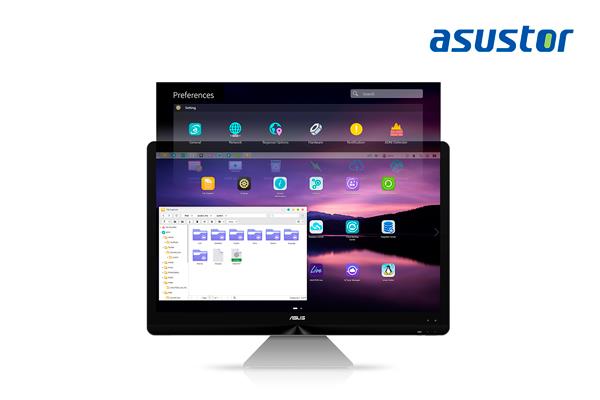
New Preferences Widget – Easily Find the Settings You Want

The all-new preferences widget design integrates all ADM settings, and integrates settings functions that were originally scattered in preferences, access control, and services into a single area. The new interface makes system management more efficient and settings easier to find. Browse and access all related settings with one click.


MyArchive Now Supports Btrfs and Snapshots

ASUSTOR’s MyArchive has been upgraded again, bringing Btrfs and snapshots.  Btrfs enables easy control of your backups by supporting snapshots and version history. If a file is unintentionally modified, it can be recovered. The advent of Btrfs on MyArchive drives enable even safer backups than ever before. MyArchive drives with Btrfs are fully supported on other ASUSTOR NAS devices that support Btrfs, strengthening protection of your data.


Applicable models: AS31, 32, 40, 50, 51, 52, 53, 61, 62, 63, 64, 65, 70

Browse and Access MyArchive Snapshots and EZ Sync Files

File Explorer has been upgraded browse more diversified data sources. In addition to MyArchive snapshots, historic versions of files are easily accessible through File Explorer to quickly restore previous versions. EZ Sync support has also been added to File Explorer to make files directly accessible. With File Explorer, files and folders can be dragged and dropped directly to and from EZ Sync folders, making EZ Sync easier than ever to use.


 

GIGABYTE Releases AORUS GTX 1070 Gaming Box
Cooler Master MasterLiquid Maker 92 – Pre Order
ASRock Announces the Radeon™ RX 6900 XT Phantom Gaming D 16G OC Graphics Card Providing Extreme 4K Gaming Experience with Flagship AMD GPU
Samsung Completes Qualification of its 2nd Generation 10nm Process Technology
Sony’s New α9 Camera Revolutionises the Professional Imaging Market
TAGGED:ADMASUSTORNAS
Share This Article
Facebook Copy Link Print
Previous Article POCO F2 PRO: THE ULTIMATE FLAGSHIP KILLER
Next Article Sony to Release World’s First Intelligent Vision Sensors with AI Processing Functionality
Leave a Comment

Leave a Reply Cancel reply

Your email address will not be published. Required fields are marked *

This site uses Akismet to reduce spam. Learn how your comment data is processed.

Recent Review

ASUS TUF GAMING Z890-PLUS WIFI – Review
Review
ASUS TUF Geforce RTX5060Ti 16GB OC
Review
ASUS Prime Radeon RX 9060 XT 16GB OC
Review
Gigabyte M27UP Dual Mode Gaming Monitor – Review
Review
ASUS ROG STRIX GS-BE18000 Review: Extreme WiFi 7 Performance
Review
ASUS Prime Radeon RX 9070 XT OC – Review
Review
TP-Link Archer TBE400UH High Gain Wi-Fi 7 USB Adapter Review
Review
ASUS ROG STRIX B850-F Gaming WiFi: Unleashing Gaming Power
Review
ASRock B860M-X WiFi: A Budget-Friendly Micro ATX Motherboard with Solid Features
Review
ASUS RT-BE92U Review – Next-Level Smart Home WiFi 7
Review

Facebook Page

© 2026 Einfoldtech Company. All Rights Reserved.
Welcome Back!

Sign in to your account

Username or Email Address
Password

Lost your password?