Einfoldtech

The Official Einfoldtech

Reading: ASUSTOR release ADM 3.5
Share
Font ResizerAa

Einfoldtech

The Official Einfoldtech

Font ResizerAa
Search
  • Home
    • Home 1
  • Categories
  • Bookmarks
  • More Foxiz
    • Sitemap
Follow US
  • Advertise
© 2026 Einfoldtech Company. All Rights Reserved.
Einfoldtech > News > ASUSTOR release ADM 3.5
News

ASUSTOR release ADM 3.5

admin
Last updated: 14/05/2020 10:46 PM
admin
Share
2 Min Read
SHARE

Taipei, Taiwan 14 May, 2020 – ASUSTOR Inc. has now opened the ADM 3.5 program, featuring a new design that brings together all system-related settings and new snapshot features for MyArchive. ADM 3.5 has also strengthened data maintenance and file management features. Download ADM 3.5 today.


New Features:

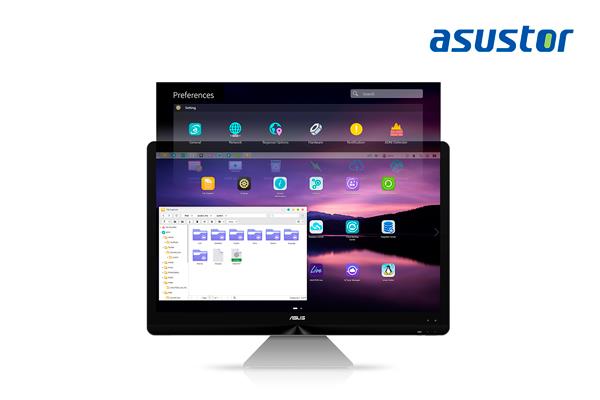
New Preferences Widget – Easily Find the Settings You Want

The all-new preferences widget design integrates all ADM settings, and integrates settings functions that were originally scattered in preferences, access control, and services into a single area. The new interface makes system management more efficient and settings easier to find. Browse and access all related settings with one click.


MyArchive Now Supports Btrfs and Snapshots

ASUSTOR’s MyArchive has been upgraded again, bringing Btrfs and snapshots.  Btrfs enables easy control of your backups by supporting snapshots and version history. If a file is unintentionally modified, it can be recovered. The advent of Btrfs on MyArchive drives enable even safer backups than ever before. MyArchive drives with Btrfs are fully supported on other ASUSTOR NAS devices that support Btrfs, strengthening protection of your data.


Applicable models: AS31, 32, 40, 50, 51, 52, 53, 61, 62, 63, 64, 65, 70

Browse and Access MyArchive Snapshots and EZ Sync Files

File Explorer has been upgraded browse more diversified data sources. In addition to MyArchive snapshots, historic versions of files are easily accessible through File Explorer to quickly restore previous versions. EZ Sync support has also been added to File Explorer to make files directly accessible. With File Explorer, files and folders can be dragged and dropped directly to and from EZ Sync folders, making EZ Sync easier than ever to use.


 

You Might Also Like

Samsung Galaxy Tab A9 and Galaxy Tab A9+: Entertainment and Productivity Engineered for Everyone
ASUS Announces the Launch of the New Vivobook S 14 in Singapore, Powered by the Latest AI-Enabled Intel Core Ultra Processors
ASUS Republic of Gamers Announces Maximus IX Extreme
ASUSTOR Debuts New Flagship NAS Models, ADM 3.0 and Surveillance Center 2.7 at Computex 2017
G.SKILL Announces New DDR4-4600MHz Extreme Performance Trident Z Memory Kit Designed for the Intel X299 HEDT Platform
TAGGED:ADMASUSTORNAS
Share This Article
Facebook Copy Link Print
Previous Article POCO F2 PRO: THE ULTIMATE FLAGSHIP KILLER
Next Article Sony to Release World’s First Intelligent Vision Sensors with AI Processing Functionality
Leave a Comment

Leave a Reply Cancel reply

Your email address will not be published. Required fields are marked *

This site uses Akismet to reduce spam. Learn how your comment data is processed.

Recent Review

MSI GeForce RTX5080 16G VANGUARD SOC
Review
MSI MEG Z890 Unify-X
Review
Xiaomi Mi A27i Monitor (2026 Model)- Review
Review
Acer Aspire 14 AMD Ryzen AI 5 330 A14-61M
Review
ASUS RT-BE58 Go – Portable Router Review
Review
ASUS TUF GAMING Z890-PLUS WIFI – Review
Review
ASUS TUF Geforce RTX5060Ti 16GB OC
Review
ASUS Prime Radeon RX 9060 XT 16GB OC
Review
Gigabyte M27UP Dual Mode Gaming Monitor – Review
Review
ASUS ROG STRIX GS-BE18000 Review: Extreme WiFi 7 Performance
Review

Facebook Page

© 2026 Einfoldtech Company. All Rights Reserved.
Welcome Back!

Sign in to your account

Username or Email Address
Password

Lost your password?